Multi-Channel Attribution for Local Service Businesses
Dec 15, 2025

Multi-channel attribution helps local service businesses understand which marketing efforts contribute to customer conversions. Unlike single-touch models, it evaluates the entire customer journey, from initial awareness to final action. This approach is especially useful for industries like HVAC, landscaping, or janitorial services, where leads often come from a mix of online and offline channels, such as Google Ads, phone calls, and yard signs.
Key Takeaways:
Why It Matters: Most leads (70–80%) in local services come from phone calls, making it hard to track their origin without multi-channel attribution.
Benefits: Businesses can reduce customer acquisition costs by 15–25% and increase revenue by properly crediting touchpoints.
Attribution Models: Options like first-touch, last-touch, linear, and data-driven models allow businesses to choose what fits their sales cycle.
Tracking Tools: Use call tracking, UTM parameters, and CRM integrations to measure both online and offline efforts.
Budget Optimization: Attribution insights help reallocate budgets to high-performing channels, improving ROI.
By combining tracking tools and attribution models, local businesses can pinpoint which marketing efforts drive results, ensuring smarter spending and better growth.
7 types of marketing attribution explained (and how to choose the right one)
Attribution Models and Their Applications
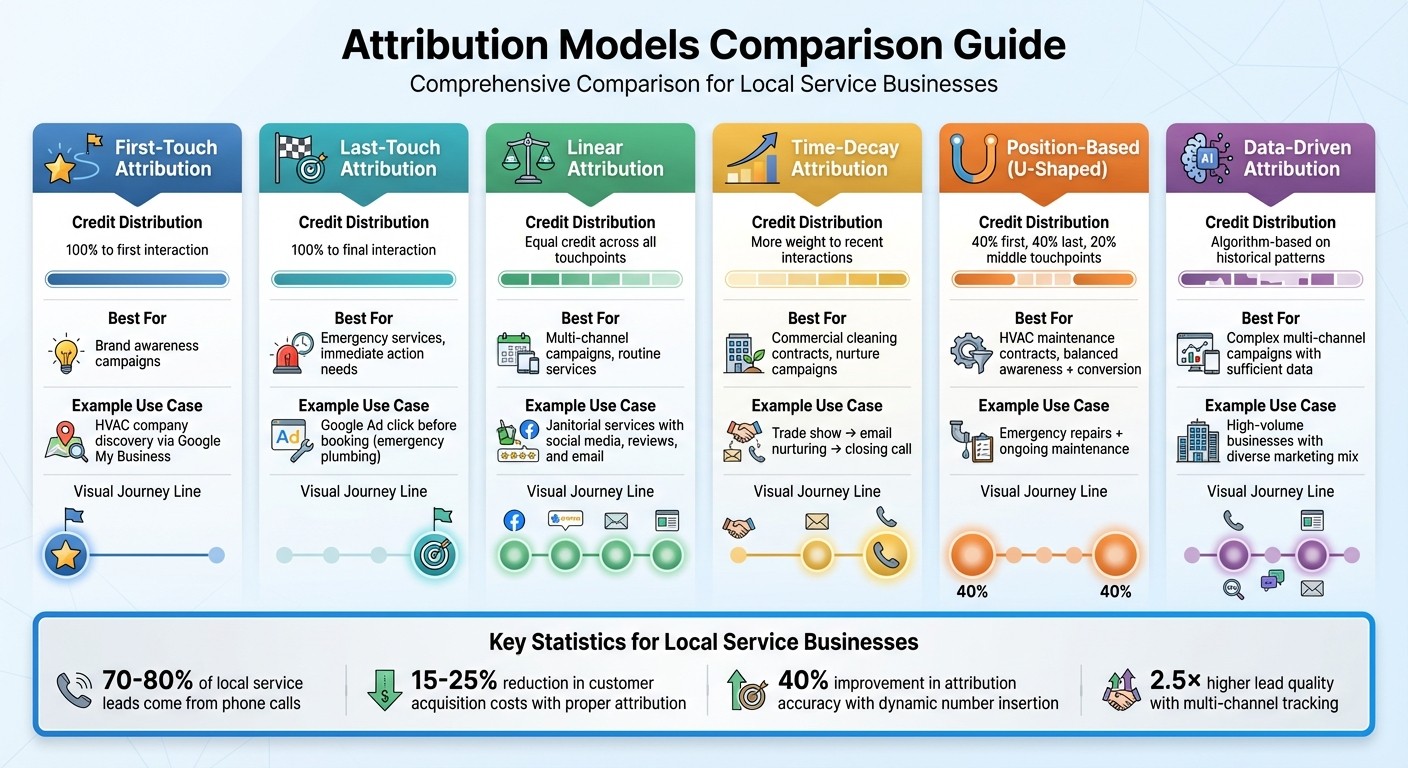
Multi-Channel Attribution Models Comparison for Local Service Businesses
Overview of Key Attribution Models
Attribution models offer different ways to evaluate your marketing performance, each assigning credit to customer interactions in unique ways throughout their journey.
First-touch attribution places all the credit on the first interaction. For example, if a homeowner finds your HVAC company through a Google My Business listing while searching for "emergency AC repair", that initial discovery gets full credit for the conversion.[8][10]
Last-touch attribution focuses solely on the final interaction before a conversion. Imagine a commercial landscaping client who receives a referral email, visits your website via organic search, and ultimately books your service after clicking on a Google ad. In this model, the Google ad - the last interaction - receives all the credit, even though earlier steps played a role.[8][2]
Linear attribution spreads credit evenly across all touchpoints. Picture a janitorial service where a potential client engages with a social media post, reads a Google review, and responds to a direct email before signing a contract. Each of these interactions would receive an equal share of the credit.[8][10]
Time-decay attribution gives more weight to interactions that happen closer to the conversion. This approach works well for scenarios like commercial cleaning contracts, where initial awareness from a trade show eventually leads to email nurturing and follow-up calls that close the deal.[9][10]
Position-based (U-shaped) attribution assigns 40% of the credit to the first interaction, 40% to the last interaction, and divides the remaining 20% among the middle touchpoints. This model is particularly useful for HVAC businesses managing both emergency repairs and ongoing maintenance contracts, as it balances early awareness with the final conversion.[8]
Data-driven attribution uses algorithms to analyze historical data and distribute credit based on patterns. This model is ideal for complex, multi-channel campaigns but requires high-quality data to deliver meaningful insights.[8][5]
With these options, businesses can select the model that best aligns with their customer journey and marketing goals.
Choosing the Right Model for Your Business
The best attribution model depends on your business type and sales cycle. For services that demand immediate action, like emergency plumbing repairs, last-touch or time-decay models often work well since the final interaction typically drives the decision. On the other hand, for long-term services such as commercial landscaping or cleaning contracts, position-based or data-driven models are better suited as they account for multiple touchpoints like referrals, email nurturing, and trust-building interactions.[8][9][11]
For businesses running multi-channel campaigns - such as routine janitorial services - linear attribution provides a fair, balanced view of performance. Tools like Google Analytics allow you to test different models side-by-side to determine which one aligns best with your revenue goals and key metrics, such as lead volume or contract value.[8][10][1]
Having a clear understanding of these models is essential before diving into tracking local marketing efforts.
Limitations of Attribution Models for Local Services
While multi-channel attribution provides a broader perspective, it has its limitations - especially for local services. Offline interactions like word-of-mouth referrals, yard signs, and branded vehicles are often difficult to track digitally. For example, phone leads generated from offline sources such as billboards or radio ads may not be fully captured by digital attribution tools. Additionally, privacy features and browser restrictions can block parts of the customer journey, leaving gaps in the data.[9]
Relying exclusively on single-touch models like last-touch can skew your understanding of performance by focusing only on final interactions and ignoring earlier touchpoints that contributed to the conversion. Testing multiple attribution models can help you develop a more complete picture of your marketing efforts.[9][1]
Tracking Local Marketing Channels
Common Marketing Channels for Local Services
Local service businesses often rely on a mix of online and offline marketing channels to attract customers. Online efforts include platforms like Google Business Profile for high-intent searches, Google Ads to capture active demand, Local Services Ads for urgent service needs, and social media to build awareness and retarget potential customers. Offline methods, such as truck wraps, yard signs, door hangers, flyers, direct mail, and local sponsorships, also play a big role in driving calls and increasing branded searches.
Your website acts as the central hub where all this traffic converges, converting visitors into leads through calls, forms, or live chat. For example, truck wraps can generate over 30,000 impressions daily in local neighborhoods[6], often leading to branded searches or direct calls. Similarly, yard signs placed at job sites create hyper-local visibility, prompting nearby residents to either search for your business name or call the number displayed. Door hangers, flyers, and direct mail campaigns target specific neighborhoods, while sponsoring local youth sports teams or community events helps to build brand recognition and trust, which can translate into increased search volume and direct inquiries.
All these efforts feed into a robust tracking system that helps you monitor and measure both digital and offline interactions effectively.
Call and Form Tracking
Tracking calls is critical because 76% of local mobile searches lead to a phone call within 24 hours[4]. One way to do this is through dynamic number insertion, which assigns different phone numbers to visitors based on their traffic source. For instance, someone arriving via Google Ads will see a different number than someone coming from Facebook, allowing for more accurate attribution. In fact, this method improves attribution accuracy by 40%[5].
For offline marketing, static tracking numbers work best. For example, you could assign one unique number to yard signs and another to truck wraps, making it easy to determine which asset generated a specific call. Similarly, form tracking captures leads from quote requests or live chat submissions by embedding UTM parameters in hidden fields. This way, when someone fills out a form, your CRM automatically logs whether they came from organic search, email, or a paid ad. Businesses that implement multi-channel tracking often see 2.5× higher lead quality and achieve 30% better ROI by optimizing their marketing spend[4].
By integrating these strategies with advanced tools, you can refine your tracking and attribution even further.
Using Cohesive AI for Attribution
Cohesive AI adds a powerful layer to your attribution system by acting as a trackable lead source. The platform uses AI to scrape Google Maps and government filings to identify local business owners, then personalizes cold email campaigns to target these prospects. With its built-in CRM and automated marketing tools, every reply, qualified lead, and closed deal can be tagged with "Cohesive AI" in your reports, ensuring clear attribution.
The platform allows you to run up to three campaigns simultaneously as part of its $500/month base plan, with each lead flowing directly into your CRM. Performance metrics like reply rates, qualified leads per campaign, and revenue per lead are tracked, much like you would monitor results from Google Ads or Facebook. This makes it easy to compare the cost per booked job from Cohesive AI with your other channels and adjust your budget as needed. Additionally, features like fully managed email deliverability and AI-driven personalization ensure campaigns perform consistently, while integrated tracking eliminates the need for manual tagging.
Building a Scalable Attribution System
Setting Up a Foundation for Tracking
Start by defining what counts as a conversion for your business. For local services, this might include booked jobs, service calls, or signed contracts. Break these down further into micro-conversions (e.g., form submissions) and macro-conversions (e.g., revenue-generating bookings). For example, a quote request could be a micro-conversion, while a confirmed service appointment would be a macro-conversion.
To track these effectively, configure GA4 to monitor key events using enhanced measurement. Add call tracking tools like CallRail to capture phone interactions, and connect your CRM via Zapier or native APIs. This setup allows you to sync leads from website forms, calls, and emails into one unified dashboard. By centralizing data across all channels, you can better understand which marketing efforts are driving results[12].
Once your tracking basics are in place, ensure precise attribution by setting up campaign-specific parameters.
Configuring UTM Parameters and Campaign Naming
For consistent tracking, adopt a standard UTM structure for all digital campaigns. Use fields like:
utm_source: Examples include google, facebook, or cohesive_ai.
utm_medium: Specify the medium, such as cpc, email, or organic.
utm_campaign: Include campaign identifiers, like summer_hvac_promo_2025.
utm_term: Highlight specific terms, such as emergency_repair.
utm_content: Differentiate ads, like ad1_vs_ad2.
For campaigns targeting janitorial or landscaping leads through Cohesive AI, you might tag links as: utm_source=cohesive_ai&utm_medium=cold_email&utm_campaign=janitorial_leads_q1. This setup lets you track opens, clicks, and conversions from AI-personalized emails, just as you would with Google Ads or Facebook campaigns.
To avoid confusion, maintain a shared document for naming conventions. Inconsistent tags can lead to losing 30–50% of tracking data[9]. Consistency ensures that GA4 accurately attributes leads, whether they come from paid ads, organic traffic, or automated outreach.
Aligning Attribution Windows and KPIs
Match your attribution windows to your sales cycle. For services like plumbing or HVAC repairs, where customers make quick decisions, a 7–14 day window works best. Routine services, like janitorial maintenance, might benefit from 30-day windows. Meanwhile, B2B services, such as landscaping or catering, may require 90+ day windows to account for longer decision-making processes[3][6]. A time-decay model is often a good fit, as it gives more credit to recent touchpoints when customers are ready to commit.
Next, define KPIs that align with your business goals. These might include:
Cost Per Lead (CPL)
Cost per booked job
Revenue per channel
Return on ad spend (ROAS)
For instance, if your HVAC company spends $500 on Google Ads and generates 50 leads, your CPL is $10. If 20 of those leads convert into booked jobs, your cost per booked job becomes $25. Use an integrated dashboard to track these metrics and evaluate channel performance weekly. This approach helps pinpoint which sources deliver the best ROI[5][3].
Attribution Window Examples | Typical Duration | Business Type |
|---|---|---|
Emergency repairs (HVAC, plumbing) | 7 days | High urgency |
Routine maintenance (janitorial) | 30 days | Medium cycle |
Long-term contracts (landscaping, catering) | 90 days | B2B sales |
Optimizing Marketing Spend and Automation with Attribution
Reallocating Budget Based on Attribution Insights
Start by generating a monthly report that breaks down your marketing spend, leads, booked jobs, revenue, and return on ad spend (ROAS) for every channel over the past 30–90 days. Rank these channels based on cost per qualified lead and profit per booked job, rather than just looking at raw numbers. For instance, if Google Ads costs $3,000 and brings in 20 customers worth $9,000, your cost per acquisition (CPA) is $150, and your ROAS is 3.0. On the other hand, if direct mail costs $2,000 and only results in 5 customers worth $4,000, your CPA jumps to $400, and your ROAS drops to 2.0. In this case, reallocating $500–$1,000 from direct mail to Google Ads or another high-performing channel makes sense.
Set clear thresholds: pause channels with a ROAS below 1.5 or a CPA more than double your target. For channels showing a ROAS above 3.0, consider increasing their budget by 10–30%. For campaigns like those powered by Cohesive AI, track specific metrics such as cost per meeting set or cost per contract won. For example, if an AI-driven email campaign delivers janitorial contracts at a CPA under $200 with a $1,000 monthly spend, it’s likely a better investment than a $2,000/month agency delivering similar results.
Multi-channel attribution also highlights assist roles - like email campaigns that nurture leads originating from Google Maps. This ensures you don’t cut channels that play a critical part in the overall conversion process, even if they don’t get the final credit.
Improving Marketing Automation with Attribution
Once your tracking and attribution systems are in place, use this data to refine your marketing automation processes. Ensure every lead is tagged with its source and campaign details. Tools like UTM parameters, call tracking, and integrations with platforms like Google Ads or Cohesive AI can link every action - calls, form submissions, email replies - back to your CRM. Automate key actions such as sending confirmation emails, creating priority tasks, or enrolling leads into personalized nurture sequences.
For leads from underperforming sources with low conversion rates or minimal engagement, adjust their treatment. Assign them lower lead scores, move them to slower drip campaigns, or exclude them from costly remarketing audiences. Additionally, integrate offline conversion data into ad platforms to make smarter bid adjustments that align with actual revenue. For example, if attribution data shows that "Emergency plumbing – city name" campaigns yield fewer leads but significantly higher average job values, you can set higher CPA allowances for those campaigns while maintaining profitability.
Testing and Iterating with Attribution Data
With your budget optimized and workflows automated, the next step is to continuously test and refine your strategies. Using the insights from your attribution data, focus A/B tests on metrics that matter - like cost per booked appointment or revenue per visitor - rather than superficial indicators like click-through rates. For example, test two Google Ads headlines, two Cohesive AI email subject lines, or two landing page designs, ensuring each variant uses unique UTM parameters for clear attribution. You could also experiment with offers, such as "instant quote" versus "free on-site estimate" on your HVAC landing page, and evaluate their impact on lead volume and downstream revenue.
Run these tests until each variant achieves at least 50–100 conversions, then shift your budget toward the winning version. For seasonal campaigns, analyze 12 months of historical data to identify patterns in CPA, ROAS, and lead quality during peak times. For example, HVAC campaigns might perform best during summer heat waves, while landscaping services may see a spike in spring. When these high-demand periods approach, prioritize channels that historically deliver a strong combination of speed and ROI, such as Google Ads or targeted Cohesive AI campaigns aimed at commercial properties gearing up for their busiest seasons.
Conclusion
Multi-channel attribution takes the guesswork out of understanding which marketing channels bring in the most profitable leads. By tracking how platforms like Google Ads, email campaigns, and phone calls work together, you can stop wasting money on ineffective channels and focus on booking appointments and signing contracts.
Businesses that adopt multi-touch attribution often see their marketing ROI increase by 15–30%, all without needing to raise their overall budget [13][7]. This is possible because they can pinpoint underperforming channels and shift resources toward strategies that deliver better results. For local service providers, where every lead matters, this reallocation can directly boost profits. It's a practical way to build a scalable and results-driven attribution system.
To make this work, you need a strong tracking setup. This includes tools like call tracking, UTM parameters, CRM integration, and consistent naming conventions. Advanced platforms like Cohesive AI can take your attribution strategy even further. Cohesive AI integrates seamlessly into your campaigns, creating trackable efforts that tie every lead interaction to measurable ROI. For $500 a month, with a guarantee of at least four interested responses or a free month, it becomes another channel you can evaluate alongside the rest of your digital marketing spend.
Once your system is in place, think of attribution as an ongoing process. Regularly analyze your data, experiment with new creative ideas on top-performing channels, and fine-tune your attribution windows to align with your sales cycle - typically 30–90 days for higher-ticket services like HVAC or commercial landscaping. Ryan Koonce, CEO of Attribution, explains it well: multi-channel attribution "bridges gaps in long buyer cycles by showing cost and credit allocation, proving marketing value to revenue" [9][1]. By setting clear goals, connecting your data sources, and continuously refining your approach, you can turn attribution into a strategic tool that drives consistent business growth.
FAQs
How does multi-channel attribution help local service businesses lower customer acquisition costs?
Multi-channel attribution enables local service businesses to pinpoint the marketing channels that generate the most leads and conversions. By understanding which strategies work best, businesses can make smarter decisions about where to direct their marketing budgets, cutting out channels that aren’t delivering results.
Focusing on high-performing channels helps reduce wasted spending, improve return on investment (ROI), and bring in more customers - without pouring money into campaigns that don’t pay off.
How do the different attribution models work, and what sets them apart?
Attribution models vary in how they distribute credit across the different touchpoints in a customer’s journey:
Last-click: This model gives all the credit to the final interaction before the conversion.
First-click: Here, the first interaction that started the customer’s journey receives 100% of the credit.
Linear: This approach spreads the credit equally across every touchpoint in the journey.
Time decay: Touchpoints closer to the conversion are given more weight, while earlier interactions receive less.
Position-based (U-shaped): This splits the credit unevenly, assigning 40% to both the first and last interactions, with the remaining 20% distributed among the middle touchpoints.
Each model offers a different perspective, helping businesses pinpoint which interactions play the biggest role in driving conversions.
What’s the best way for local service businesses to track the success of offline marketing efforts?
Local service businesses can keep tabs on their offline marketing efforts by tapping into tools that streamline lead collection and follow-up. For instance, using technology to gather data from platforms like Google Maps or public records can help pinpoint potential customers. By crafting personalized email campaigns and managing them efficiently, businesses can stay connected with these leads. This approach not only keeps engagement high but also provides clear insights into how offline strategies contribute to bringing in new customers.