Google Maps Scraping for Industry-Specific Lead Segmentation
Jan 14, 2026

Want better leads for your business? Google Maps scraping can help you quickly gather detailed business data, saving time and improving lead quality. Here's how it works:
What it is: Automated tools extract public data like names, addresses, phone numbers, and websites from Google Maps.
Why it matters: Instead of wasting time on manual research, you can focus on outreach. Nearly 50% of Google searches are local, and Google Maps has data on 200M+ businesses globally.
How it helps: Scraping tools collect up to 40+ data points (e.g., ratings, reviews, social profiles) for precise targeting, like finding businesses with low ratings or no websites.
Steps to use it:
Define your target industries and locations.
Use automated tools to extract business data.
Filter and segment leads by criteria like ratings, location, or business size.
Enrich data for personalization (e.g., owner names, email validation).
Export and integrate the data for outreach.
This method transforms raw data into actionable leads, helping sales teams focus on closing deals instead of researching. Platforms like Cohesive AI even automate campaigns for local service businesses, offering cost-effective alternatives to traditional agencies. By focusing on specific industries and locations, you can generate higher-quality leads and boost conversions.
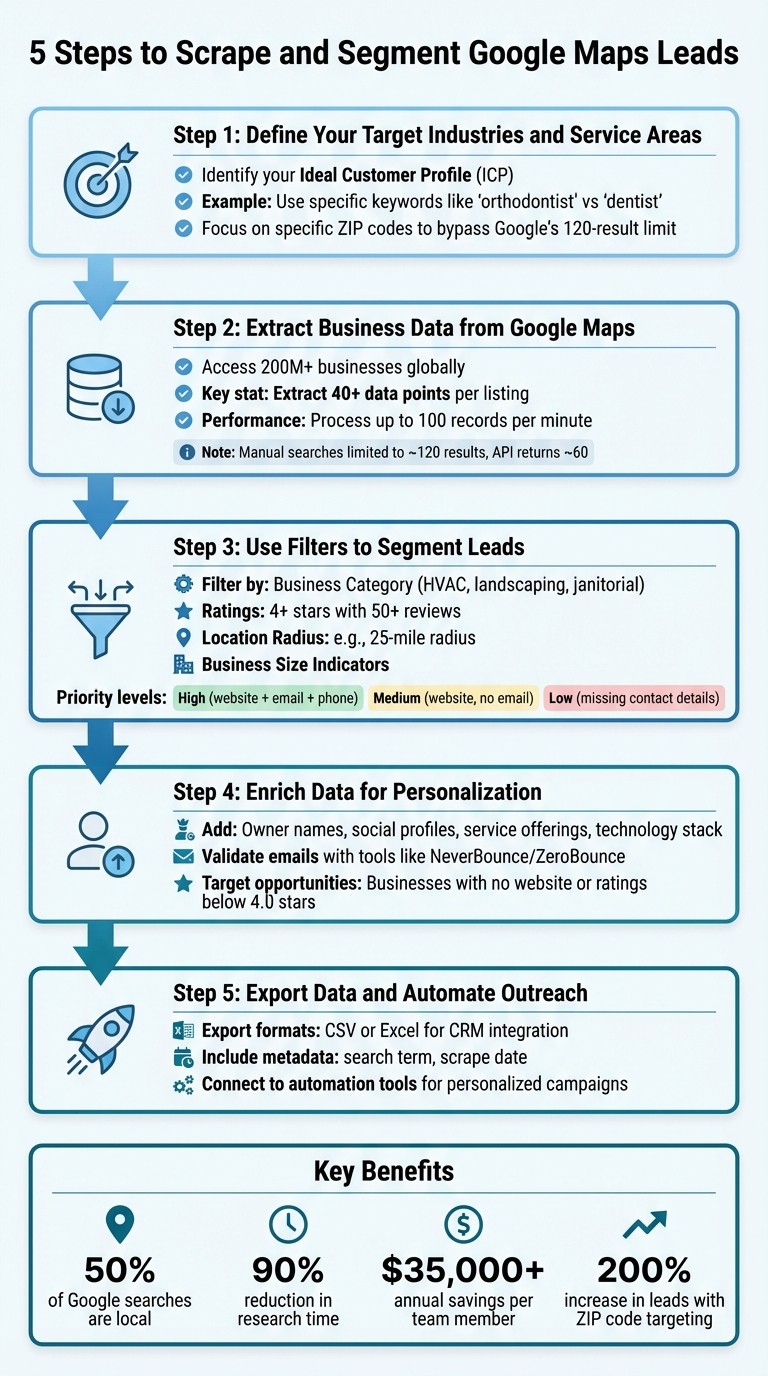
5-Step Google Maps Lead Scraping Process for Business Targeting
Google Maps Scraper: How to Get 1,000 Leads for FREE
Why Targeting Specific Industries Improves Lead Quality
Casting a wide net often leads to wasted time and money. For instance, if you scrape Google Maps for "businesses in Dallas", you might get results from unrelated sectors like pet grooming or law firms - businesses that likely have no need for your services. By narrowing your focus to specific industries, you can zero in on the types of businesses that genuinely need what you offer. Take a janitorial company as an example: targeting searches like "office buildings" or "medical clinics" automatically filters out irrelevant prospects, boosting conversion rates and cutting down on wasted outreach. And there’s solid data to back this up.
Google Maps hosts over 200 million business listings across more than 4,000 industry sectors [7]. This means industry-specific targeting doesn’t just increase the number of leads - it improves their quality by aligning them with your ideal customer profile.
Geographic precision adds another layer of value. A broad search for "Manhattan plumbers" might return 187 results, but breaking it down by ZIP codes could uncover as many as 560 listings - a 200% increase in potential leads [7]. This approach also bypasses Google’s 120–200 result limit for city-wide searches, revealing opportunities that would otherwise go unnoticed [7][8]. By segmenting your search geographically, you open the door to more targeted and personalized outreach.
Speaking of personalization, this refined targeting makes tailored messaging much easier. When you know a prospect’s specific industry and needs, you can craft messages that resonate. Small business owners are busy, and messages that address their unique pain points stand out, leading to better engagement rates [8][9]. Tools like Cohesive AI leverage this detailed data to streamline personalized outreach. In fact, 60% of companies now use automation to replace manual research, demonstrating how precision targeting delivers measurable ROI [7].
The payoff? Sales teams can skip chasing unqualified leads and focus on closing deals. By using automated filters to hone in on the right industries, every outreach effort becomes more impactful, turning conversations into conversions.
How to Scrape and Segment Google Maps Leads
Pulling business data from Google Maps and turning it into actionable leads involves a step-by-step process. By following these steps, you can transform raw map listings into organized leads that are ready for outreach.
Step 1: Define Your Target Industries and Service Areas
Start by identifying your Ideal Customer Profile (ICP). For instance, if you're targeting janitorial companies, you might focus on office buildings, medical clinics, or fitness centers. Use specific keywords like "orthodontist" instead of broader terms like "dentist" to refine your search and avoid irrelevant results [3].
Geographic targeting is just as critical. Instead of broad searches like "HVAC contractors in California", narrow your focus to specific ZIP codes or cities. This helps you bypass Google’s 120-result display limit and ensures you capture a more complete list of prospects [2].
Step 2: Extract Business Data from Google Maps
Google Maps contains information on over 200 million businesses, but manual searches are limited to about 120 results, and the official API only returns around 60 results per query [1]. To overcome this, automated tools can help.
Tools like Selenium or Playwright can extract dynamic details such as review counts, service categories, and operating hours that aren’t available in static HTML [4]. Advanced scrapers can gather over 40 data points per listing and process up to 100 records per minute, saving you hours of manual work [4]. To avoid detection, use residential proxies and randomize delays between actions [4].
Since email addresses are rarely displayed directly on Google Maps, advanced scrapers can follow website links to extract publicly available contact details [4].
Step 3: Use Filters to Segment Leads
Once you've collected raw data, filtering it by industry-specific criteria can help you identify high-quality prospects. Here are some common filters:
Business Category: Focus on specific industries like HVAC, landscaping, or janitorial services.
Ratings and Reviews: Target businesses with 4+ stars and 50+ reviews to find those with strong public engagement [2].
Location Radius: Narrow your focus to a defined area, such as a 25-mile radius around a city.
Business Size Indicators: Use proxies like extended operating hours or high review volumes to estimate business size.
You can also prioritize leads based on the completeness of their contact information. For example:
High-priority leads: Have a website, email, and phone number.
Medium-priority leads: Have a website but no email.
Low-priority leads: Lack key contact details [5].
Leads with a "claimed" Google Business Profile can also be more responsive, as this indicates active management of their online presence [4].
Step 4: Enrich Data for Personalization
Adding extra details to your leads can make your outreach more effective. Look for owner names, social media profiles, and specific service offerings. Some advanced tools can even identify a business’s technology stack, which is particularly useful if you’re selling digital services [4].
For example, businesses without a website (where the websiteUri field is blank) are great candidates for web design and SEO services [10]. Similarly, businesses with ratings below 4.0 stars could benefit from reputation management services.
To ensure your outreach is effective, validate email addresses using tools like NeverBounce or ZeroBounce. This helps protect your sender reputation and ensures your messages reach the right people [2]. Normalize phone numbers to the E.164 format and remove duplicates based on business name and address for a clean, accurate list.
Step 5: Export Data and Automate Outreach
Once your leads are filtered and enriched, the final step is to integrate them into your outreach workflow. Export the data in a format compatible with your tools, such as CSV or Excel, for seamless CRM integration. Including metadata like the original search term and scrape date can help you organize and refine your leads later [2].
For streamlined outreach, connect your lead data with tools like Cohesive AI. This platform enables personalized, automated campaigns tailored to industries like janitorial, landscaping, and HVAC. From crafting personalized messages to managing email deliverability, Cohesive AI handles the entire process, transforming your segmented leads into effective outreach campaigns.
Conclusion
Google Maps scraping has revolutionized how local service businesses connect with potential clients. By following the five steps in this guide - defining your target industries, extracting business data, filtering with specific criteria, adding personalized details, and exporting the data for outreach - you can create highly targeted lead lists in just minutes. This method eliminates the need for time-consuming manual research, freeing up your team to focus on what truly matters: closing deals.
With information on over 200 million businesses worldwide [8], Google Maps is a goldmine for lead generation. Automated scraping tools can cut research time by up to 90% [6], translating to significant labor cost savings - potentially over $35,000 per team member annually [6]. But it’s not just about gathering data quickly; it’s about gathering the right data. By combining this efficiency with industry-specific segmentation, you’re not just increasing your lead volume - you’re improving your lead quality, targeting prospects that are more likely to convert.
For industries like janitorial services, landscaping, and HVAC, platforms like Cohesive AI take this process a step further. After scraping and segmenting your leads, Cohesive AI integrates that data into automated, personalized outreach campaigns. At $500 per month, with a guarantee of at least four interested responses each month, it offers an alternative to traditional lead generation agencies - giving you complete control over your targeting while ensuring measurable results.
The key to success lies in precision. Instead of casting a wide net, this approach allows you to identify businesses that perfectly match your ideal customer profile. Whether you’re focusing on HVAC contractors in specific ZIP codes, landscaping companies with strong online reviews, or businesses lacking a website that could benefit from your services, every lead is chosen for a reason. This is the difference between busywork and a strategy that drives real growth.
FAQs
How does Google Maps scraping help improve the quality of leads?
Google Maps scraping allows businesses to gather accurate and current details like business names, addresses, phone numbers, websites, categories, ratings, and reviews. This process ensures your data is well-organized, error-free, and free of duplicates, making it simpler to categorize leads by industry or niche.
Having reliable data means you can focus on targeting the right leads more effectively. It also enables personalized outreach, which often leads to better conversion rates. This approach is particularly useful for local service businesses, where customized communication can play a key role in driving success.
What are the best tools for scraping data from Google Maps?
Some of the best tools for pulling data from Google Maps include Apify, Outscraper, PhantomBuster, and Octoparse. These tools help you collect detailed business information like contact details, addresses, and customer reviews - valuable data for segmenting leads in specific industries.
For a more hands-off approach, platforms like Cohesive AI offer automation by scraping Google Maps, using AI to personalize outreach, and managing email campaigns. This is especially useful for local service industries such as janitorial services, landscaping, and HVAC, making lead generation faster and more accurate.
How does targeting specific industries improve lead conversion rates?
Focusing on specific industries can significantly improve lead conversion rates by allowing you to craft highly tailored lead lists. When your outreach aligns closely with the unique needs and preferences of a particular sector, prospects are more likely to find your message relevant and engaging.
By honing in on industry-specific challenges and opportunities, your messaging becomes more relatable and impactful. This not only boosts response rates but also increases the likelihood of converting leads into customers. Ultimately, this targeted approach helps businesses connect with the right audience while making their lead generation efforts more efficient.