What Are Behavior-Based Outreach Triggers?
Dec 16, 2025

Behavior-based outreach triggers send automated, personalized messages based on a prospect’s actions - like opening an email, visiting a pricing page, or filling out a form. Unlike traditional campaigns that follow fixed schedules, these triggers respond in real time, ensuring timely and relevant communication.
Key Benefits for Local Service Businesses:
Higher Engagement: Triggered emails see 40–50% open rates vs. 15–20% for standard emails.
Better Conversions: Emails based on behavior drive 320% higher transaction rates.
Improved Lead Quality: Lead quality improves by 35%, with customer acquisition costs dropping by 25%.
Increased Revenue: Behavior-based emails generate 6× more revenue per recipient.
Main Trigger Types:
Email Engagement Triggers: Actions like opens, clicks, or replies signal interest and prompt follow-ups.
Website Behavior Triggers: Visits to pricing pages or repeat visits indicate readiness to buy.
Form and Calendar Triggers: Requests for quotes or bookings show high intent and demand immediate outreach.
How Do Behaviorally Triggered Emails Work?
Main Types of Behavior-Based Outreach Triggers
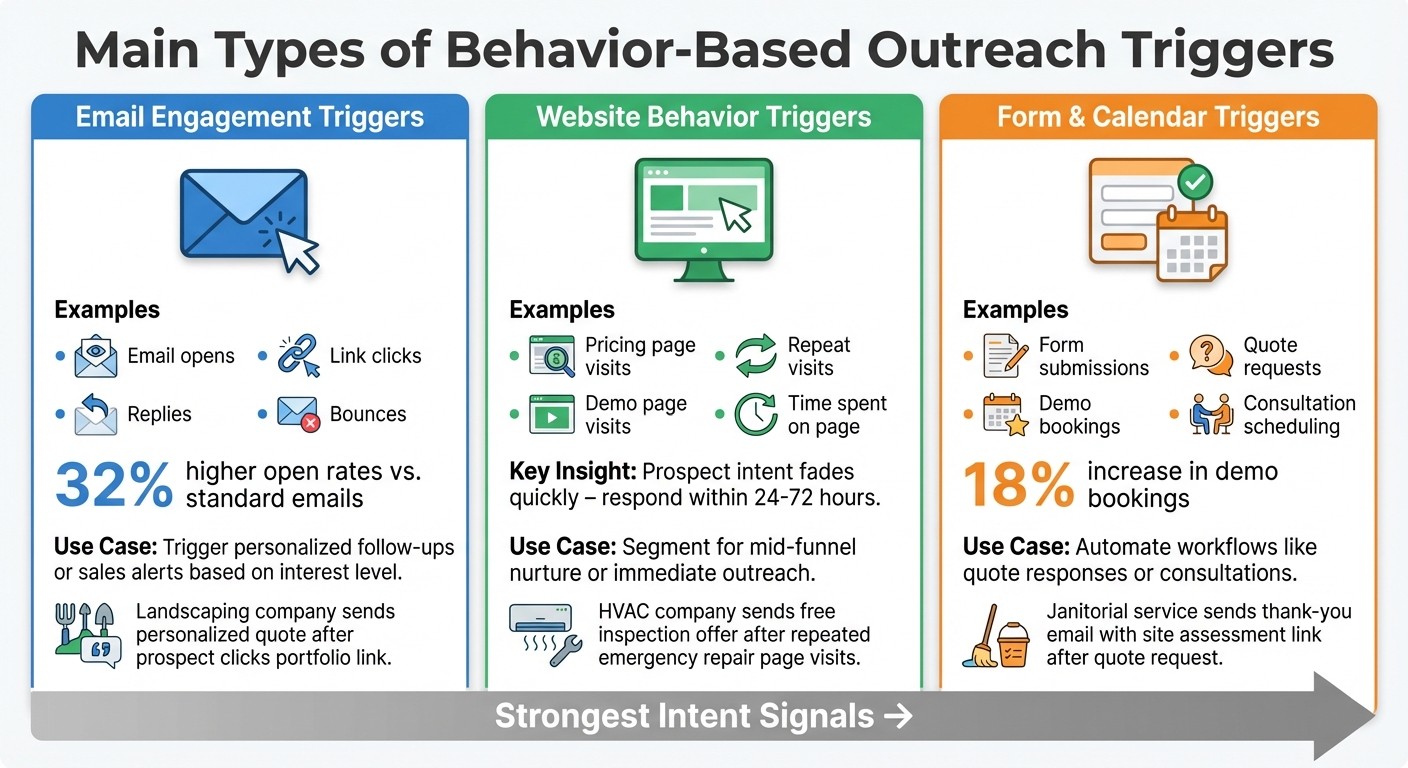
Three Types of Behavior-Based Outreach Triggers for Local Service Businesses
Behavior-based triggers are grouped into three main categories, each focusing on specific actions prospects take. For local service businesses, understanding these triggers is key to automating outreach at the perfect moment when leads show they're ready to move forward.
Email Engagement Triggers
Email engagement triggers track how prospects interact with your emails - whether they open them, click on links, reply, or if the emails bounce. Each action provides a different level of insight into their interest. For instance, opening an email shows initial curiosity, while clicking on a link signals deeper engagement. A reply? That’s a clear sign of serious interest and should prompt an immediate sales alert.
Take a landscaping company as an example. If a prospect clicks on a link to view a service portfolio, it’s the perfect moment to send them a personalized quote. This type of timely outreach works because triggered email campaigns achieve 32% higher open rates compared to standard emails, according to cybersecurity outreach data [2]. On the other hand, bounces highlight outdated contact details, helping you clean up your email list and focus efforts on active leads.
But email isn’t the only way to gauge intent - website behavior is another goldmine of information.
Website Behavior Triggers
Website behavior triggers focus on how prospects interact with your site, such as visiting specific pages, spending time on pricing sections, or making repeat visits. These actions often signal that a lead is highly interested. For example, if someone visits your pricing page twice in two days, they’re likely comparing options and are close to making a decision.
Picture an HVAC company noticing a prospect repeatedly checking the "emergency repair" page during a summer heatwave. This could trigger an automated email offering a free inspection, ensuring the business reaches out at the right time. Similarly, a business broker tracking time spent on acquisition listings might follow up with a call to discuss current opportunities. Timing is everything - prospect intent fades quickly, so responding within 24 to 72 hours is critical to avoid missing out [1][7].
Then there are even stronger signals, like direct actions on your site.
Form and Calendar Triggers
Form and calendar triggers are activated when prospects take direct actions like filling out contact forms, requesting quotes, or booking consultations. These are the clearest signs of intent because the prospect is actively reaching out to you. For instance, a janitorial service might receive a quote request and immediately send a thank-you email with next steps, including a link to schedule a site assessment. This ensures a quick, personalized response.
Calendar bookings work similarly. When a catering prospect books a tasting appointment, the system can send a confirmation email along with upsell opportunities for related services. These types of triggers have shown to increase demo bookings by 18% in similar automated workflows [2]. For local service businesses, form submissions should immediately place leads into "hot" workflows, alerting sales teams to act within hours while the prospect’s interest is still fresh.
Trigger Type | Examples | Use in Outreach |
|---|---|---|
Email Engagement | Opens, link clicks, replies, bounces | Trigger personalized follow-ups or sales alerts based on interest level [1][2][4] |
Website Behavior | Pricing/demo page visits, repeat visits, time on page | |
Form/Calendar | Form submissions, demo requests, bookings | Automate workflows like quote responses or consultations [2][3][5] |
These examples highlight how businesses can set up workflows that act on these triggers, ensuring outreach happens at the right time with the right message.
How Behavior-Based Triggers Work
Once you’ve identified the types of triggers you want to use, the next step is figuring out how to implement them effectively. Most CRMs and sales automation tools let you create workflows using simple if/then logic. For instance, if a prospect takes a specific action, the system can automatically carry out a follow-up task. The key is to pinpoint high-intent behaviors and link them to automated responses.
Setting Up Trigger Conditions and Workflows
Start by identifying 5–8 key behaviors that signal a strong buying intent. For example, a local HVAC company might track actions like a prospect visiting the "emergency repair" page twice within three days, opening an email multiple times, or downloading a case study. Once you’ve defined these triggers, configure your CRM or automation tool to respond accordingly.
Here’s a practical example: if a lead visits your pricing page twice within three days, earns a lead score of 30 or more, and falls within your service area, the system could send a personalized email, notify your sales team, and mark the lead as "hot." Many CRM platforms offer easy-to-use tools for setting up these workflows, so you don’t need advanced technical skills to get started.
Timing is everything - responding within 24–72 hours can make a huge difference. For instance, in March 2023, a cybersecurity firm used trigger marketing with emotionally engaging LinkedIn ads and email subject lines. The result? A 32% increase in email open rates and an 18% boost in demo bookings [2].
Lead Scoring and Segmentation
Once your triggers are in place, lead scoring and segmentation help you decide which leads deserve immediate attention. Lead scoring assigns numerical values to different actions, making it easier to prioritize outreach. For example:
High-value actions like requesting a demo or booking a consultation might earn +50 points.
Medium-intent actions, such as visiting the pricing page or opening an email multiple times, could earn +20 points.
Lower-intent behaviors, like opening a newsletter, might get +10 points.
Many platforms allow you to automate these scoring systems. Leads that accumulate over 70 points, for instance, can be automatically flagged as "hot" and sent to your sales team for immediate follow-up.
Segmentation takes this a step further by grouping leads into categories like hot, warm, or cold based on their behaviors. Hot leads often demonstrate multiple high-intent actions, warm leads might show moderate engagement (like downloading content), and cold leads typically remain inactive. This segmentation lets you focus your efforts where they’re most needed. For example:
Hot leads can go straight to your sales team for direct outreach.
Warm leads might stay in nurturing campaigns with educational content.
Cold leads can receive occasional, less frequent communications.
For small businesses with limited resources, this kind of prioritization ensures you’re focusing on the prospects most likely to convert.
Compliance and Privacy Requirements
When tracking behaviors like email opens or website visits, it’s essential to stay compliant with U.S. laws. The CAN-SPAM Act requires that every automated email includes a clear unsubscribe link, your physical mailing address, and that opt-out requests are processed within 10 business days. Avoid misleading subject lines or sender names, and clearly mark promotional emails to avoid fines, which can reach up to $43,792 per violation.
For tracking website behaviors, disclose the use of cookies and tracking pixels in your privacy policy and through cookie banners, giving users the option to manage their preferences. While email open tracking is common, recent privacy updates - like Apple Mail Privacy Protection - make actions such as link clicks or form submissions more reliable indicators of engagement. Use tools with built-in consent management to automatically handle unsubscribed leads and conduct regular audits to keep your consent records up to date.
If your outreach includes SMS or phone calls, make sure you’re also following TCPA regulations. For U.S.-focused campaigns, staying compliant with these rules is critical to maintaining trust and avoiding penalties.
Benefits for Local Service Businesses
Now that we’ve covered how behavior-based triggers work, let’s dive into the specific ways they can benefit local service businesses. These methods help providers act quickly and manage leads more effectively, which can have a direct impact on revenue and growth.
Better Timing and Personalization
Behavior-based triggers allow you to engage with prospects when they’re most interested, rather than sticking to a rigid schedule. Instead of relying on broad, generic messages, you can tailor your outreach to specific actions. For example, imagine a property manager visits your "office cleaning pricing" page twice in two days or a restaurant owner clicks the "request quote" button but doesn’t finish the form. Following up on these actions within 24–72 hours can significantly increase response rates.
This strategy works because the messaging feels personal and timely. Saying something like, "I noticed you were checking out our weekly office cleaning plans yesterday", makes the outreach feel relevant instead of random. For local service providers in industries like janitorial services, landscaping, or HVAC, this kind of targeted communication can turn what might otherwise feel like cold outreach into meaningful conversations. Not only does this improve engagement, but it also simplifies lead management - something we’ll explore more in the next section.
More Efficient Lead Management
For small teams, chasing every lead equally isn’t realistic. Behavior-based triggers help by identifying high-intent prospects and prioritizing them over less engaged contacts. For instance, if someone visits your pricing page multiple times, opens several emails, or submits an estimate request, the system can flag that lead for immediate follow-up. This way, your team can focus on the contacts most likely to convert, ultimately improving your return on investment.
Tools like Cohesive AI can make this process even smoother for local service businesses. These tools can scrape local prospects from Google Maps or government filings, personalize cold emails using AI, and manage multi-step campaigns based on engagement. For janitorial, landscaping, and HVAC companies, this means you can run highly targeted, behavior-driven outreach campaigns without needing a full-scale lead generation agency. Lead scoring and segmentation also make it easier to route the most promising prospects directly to your sales team, saving time and effort.
Common Risks and How to Avoid Them
While behavior-based triggers are powerful, over-automation can backfire. Sending too many messages based on minor actions - like a single visit to your homepage - can irritate prospects and harm your brand’s reputation. To avoid this, start with 5–8 high-intent triggers, such as repeated visits to your pricing page or completed quote-form submissions. Limit the frequency of messages so no prospect receives more than one triggered message within 24–48 hours, and always honor unsubscribe or opt-out requests.
Another challenge is poor data quality. Outdated email addresses, incomplete contact records, or inconsistent tracking can lead to irrelevant outreach. To prevent this, regularly clean your contact lists, verify email addresses, and ensure your tracking practices are consistent. Before rolling out a new workflow, test it on a small group to identify any issues. It’s also a good idea to align marketing and sales teams with clear documentation and service-level agreements (SLAs) - for instance, committing to a phone call within one business hour for estimate requests. This helps ensure leads don’t fall through the cracks and keeps your outreach efforts running smoothly.
Best Practices for Using Behavior-Based Outreach Triggers
Start with High-Intent Triggers
To get the most out of behavior-based triggers, begin with actions that show clear intent and align directly with revenue goals. Instead of automating everything at once, focus on three to five key behaviors that signal strong interest. Examples include requests for quotes or estimates, multiple visits (two or more within 48 hours) to pricing or service pages, abandoned booking forms where contact details were provided, or engagement with estimate emails like replies or link clicks[1][2][5][7]. Start by setting up straightforward workflows for these triggers - like sending a confirmation email followed by a same-day call - and track their performance over 30–60 days before layering in more complex triggers[1][5][7].
Match Content to Behavior
The key to effective outreach is making every message feel relevant and timely, rather than generic. Whether you’re reaching out via email, text, or phone, tailor your message to the specific action the prospect took. Acknowledge what they did, explain how you can help, and provide one clear next step[1][4][5][6].
For instance, if a restaurant owner visits your commercial kitchen cleaning pricing page twice, you could say: "I noticed you were exploring our kitchen cleaning services - would a quick 10-minute call to discuss pricing and scheduling work for you?" Similarly, if someone starts a quote form but doesn’t complete it, send a reminder that references their progress, clarifies pricing details, and offers a quick follow-up call[5][7]. And if a prospect clicks on a link for emergency HVAC repair, your follow-up should highlight your fast response times and reliability, rather than generic service features[1][4]. These personalized messages make your outreach feel timely and helpful, while automated tools can help you scale this approach effectively.
Use Tools Like Cohesive AI
Automation tools can take these practices to the next level by making personalization and timing seamless. For smaller businesses without large sales or marketing teams, manually managing behavior-based triggers can be overwhelming. Tools like Cohesive AI simplify this process by identifying leads from sources like Google Maps and government filings, crafting personalized emails based on behavior and context, and managing multi-step campaigns at scale[1][4][7].
For example, a janitorial company could use Cohesive AI to identify office managers, send a custom email tailored to the building’s size and type, and trigger follow-ups based on engagement. Whether the lead opens the email without clicking, clicks on a case study, or fills out a quote form, the system adjusts the follow-up to be timely and relevant[1][4][5][7]. This approach allows small teams to focus on closing deals while ensuring their outreach stays precise and personal.
Conclusion
Behavior-based outreach triggers give local service businesses a smarter, more efficient way to connect with potential customers. Instead of relying on broad, calendar-based campaigns, these triggers respond to real-time actions like visits to pricing pages, email clicks, or quote requests. Automated follow-ups ensure prospects are contacted when their interest is highest - usually within 24–72 hours[7] - with messages that feel timely and relevant.
For industries like HVAC, janitorial services, landscaping, and other local businesses, this approach means better lead prioritization, quicker responses, and smarter use of sales resources. By focusing on high-intent prospects, businesses can avoid wasting time chasing cold leads and instead concentrate on those most likely to convert.
Start by identifying key actions that signal strong interest - like repeated visits to service pages or submitting a quote request. Then, set up workflows with lead scoring to automatically route these promising leads to your sales team. Adding automation tools to this process can further improve efficiency and results.
To make things even easier, tools like Cohesive AI can help streamline your efforts. It simplifies lead generation by gathering local business leads, using AI to personalize outreach, and managing multi-step campaigns. At $500 per month with no long-term contracts and a guarantee of at least four interested responses each month, it’s a cost-effective way to scale your outreach while staying precise and compliant.
FAQs
What are behavior-based outreach triggers, and how can local service businesses use them effectively?
Behavior-based outreach triggers are actions or signals that show a potential customer's interest - like browsing a website, filling out an inquiry form, or interacting with content. Local service businesses can use these triggers to send timely, personalized messages that resonate with their audience.
With the help of AI-powered tools, businesses can automate email campaigns that align with these specific behaviors. These tools can sift through customer data, create tailored messages, and even handle follow-ups automatically. This strategy helps boost engagement and improves conversion rates by connecting with potential clients at just the right time with a message that feels relevant and personal.
What legal and ethical guidelines should I follow when using behavior-based outreach triggers?
When leveraging behavior-based outreach triggers, it's essential to stay within legal and ethical boundaries. This means adhering to privacy regulations like the CAN-SPAM Act and GDPR, securing explicit consent when necessary, and making it simple for recipients to opt out of your communications. Being transparent is non-negotiable - avoid any misleading tactics and handle data with care to maintain trust with your audience.
By following these principles, you can craft outreach campaigns that not only deliver results but also respect your recipients' rights and preferences.
How do behavior-based outreach triggers help improve lead quality and boost conversion rates?
Behavior-based outreach triggers let you connect with prospects at just the right time by responding to their actions or behaviors. For instance, these triggers can activate when someone visits your website, clicks on a particular piece of content, or interacts with an email.
This approach feels timely and personal, aligning your outreach with where the prospect is in their decision-making process. By focusing on their current interest and intent, local service businesses can engage leads when they're most open to communication, leading to better conversion rates and more efficient results.