Google Maps Scraping for Competitor Data
Jan 7, 2026

Google Maps is a treasure trove of business data, offering insights on over 200 million businesses across various industries. Scraping this data can help local service providers - like landscapers, HVAC contractors, and cleaning services - analyze competitors, identify underserved markets, and refine their strategies. From ratings and reviews to operating hours and contact details, the platform provides actionable information to improve market positioning.
However, scraping comes with legal and ethical considerations. While U.S. courts permit scraping public data, Google’s Terms of Service prohibit it, making compliance a key factor. Businesses can choose between using the official Google Places API, which is more restrictive but compliant, or custom scraping tools, which provide more data but require technical expertise and risk management.
Key takeaways:
Data to collect: Ratings, reviews, operating hours, geospatial data, and contact details.
Methods: Keyword-based searches, area-based extraction, or combining API with custom scraping.
Tools: Python libraries (Selenium, BeautifulSoup), no-code platforms (Outscraper, ParseHub), and proxy services for large-scale scraping.
How To Scrape Local Business Leads Using Google Maps for FREE (2025 UPDATE)
Legal and Ethical Rules for Scraping
Google Places API vs Custom Web Scraping Comparison
Google's Terms of Service (ToS) explicitly prohibit exporting or scraping data from Google Maps. However, U.S. courts have consistently ruled that scraping publicly accessible information is not a criminal offense [7]. Violations of ToS are treated as civil matters, not criminal ones [7]. For example, in the hiQ Labs v. LinkedIn case, the Ninth Circuit Court of Appeals clarified that scraping data available to the public does not violate the Computer Fraud and Abuse Act (CFAA) [7]. These legal distinctions are important for understanding the methods and tools discussed later in this article.
Google's Terms of Service Requirements
Google has implemented strong anti-bot measures to protect its data. If scraping is detected while logged into an account, it can lead to temporary IP bans lasting 15–60 minutes or, in some cases, permanent account termination. To reduce these risks, scraping as a logged-out user is a safer option. However, full compliance with Google's policies requires using the Google Places API [4][5][7]. That said, the API has its limitations - it caps results at 20 per call and allows a maximum of 60 results per query [6].
Data Privacy Laws and Regulations
While collecting business names and addresses is generally allowed, personal data found in user reviews is subject to strict privacy laws like GDPR (in the EU) and CCPA (in California) [6][7]. Under GDPR, even public data classified as "personal data" requires a lawful basis for processing [9]. For example, a Polish company was fined for scraping public business registry data without notifying individuals [9]. On the other hand, CCPA is more lenient, often exempting "publicly available information" that individuals have voluntarily shared from its strictest provisions [9]. If you're scraping reviews for sentiment analysis, ensure compliance by filtering out personal details such as names, profile photos, and contact information [6]. Karan Sharma from PromptCloud highlights the importance of ethical use:
"Accessing public data is usually legal. Misusing that data is not" [10].
Google Places API vs. Custom Scraping
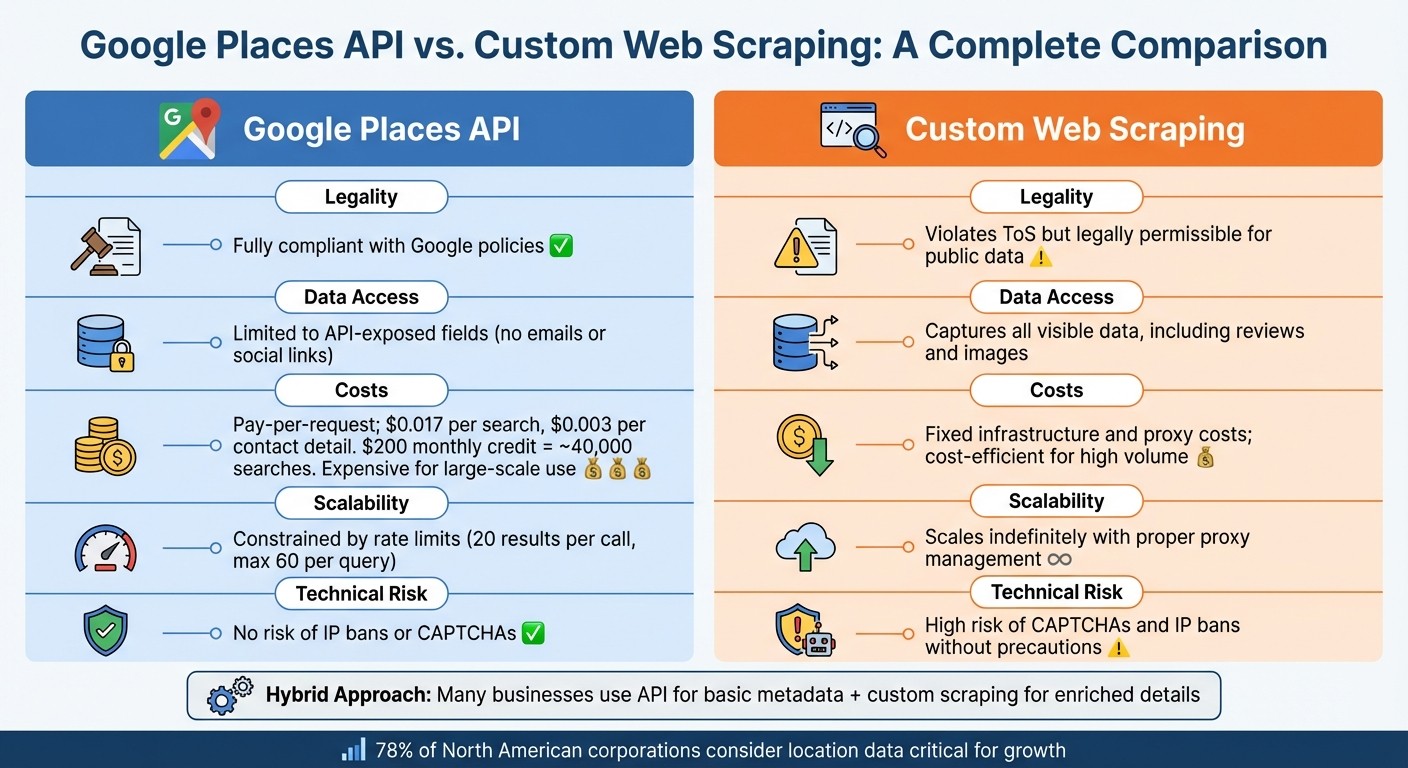
Choosing between the official Google Places API and custom scraping depends on factors like your budget, the type of data you need, and your risk tolerance. Google offers a $200 monthly credit for its Maps Platform, which covers approximately 40,000 basic searches [7]. Standard Place Details requests cost about $0.017 each, while contact details cost $0.003 per request [7]. For businesses requiring large-scale data extraction, these costs can add up quickly. Custom scraping, on the other hand, can be more cost-effective but requires tools like residential proxies and rate-limiting strategies to avoid detection [4][5][7]. Notably, over 78% of North American corporations consider location data critical for their growth strategies [7].
Factor | Google Places API | Custom Web Scraping |
|---|---|---|
Legality | Fully compliant with Google policies [4] | Violates ToS but legally permissible for public data [7] |
Data Access | Limited to API-exposed fields (no emails or social links) [4][6] | Captures all visible data, including reviews and images [4][8] |
Costs | Fixed infrastructure and proxy costs; cost-efficient for high volume [4][7] | |
Scalability | ||
Technical Risk | No risk of IP bans or CAPTCHAs [7] | High risk of CAPTCHAs and IP bans without precautions [4][5][7] |
Many businesses adopt a hybrid approach to balance compliance and data needs. For example, they might use the API for basic metadata while relying on custom scraping to gather additional details. This strategy helps manage legal risks while providing comprehensive data for competitive analysis.
What Competitor Data to Collect
Tap into Google Maps' massive database of over 200 million listings to gather competitive insights [13][14]. Focus on collecting data that directly impacts your positioning and helps shape smarter strategies.
Core Data Fields to Extract
Start with the basics: identity and contact information. This includes the business name, full address (street, city, state, ZIP code), phone numbers, and website URLs [3][13]. Then, move on to performance metrics like average star ratings and total review counts. These figures give you a clear picture of where you stand compared to local competitors [13][16].
Operational details, such as opening hours, holiday schedules, and whether a business is operational, temporarily closed, or permanently closed, can highlight service gaps you might exploit [3][16].
Geospatial data, like latitude, longitude, Plus Codes, and H3 indexes, is another goldmine. Use it to map competitor density and pinpoint underserved areas [3][16]. Insights into customer behavior, such as "Popular Times", can show when competitors experience peak traffic. This can help you fine-tune staffing levels or time your promotions to attract overflow demand [3][11]. Additionally, enriched lead data - like social media profiles (Facebook, Instagram, LinkedIn, Twitter, YouTube) and email addresses sourced from linked websites - can expand your outreach opportunities [3][11][16].
Data Category | Specific Fields | Strategic Use Case |
|---|---|---|
Identity | Name, Category, Place ID, Website | Competitor identification and directory building |
Reputation | Rating, Review Count, Review Text | Sentiment analysis and benchmarking |
Contact | Phone, Email, Social Media Links | B2B lead generation and outreach |
Location | Address, Lat/Long, Neighborhood | Market saturation and expansion planning |
Engagement | Popular Times, Typical Time Spent | Operational efficiency and traffic analysis |
Offerings | Price Range, Menu, Service Options | Competitive pricing and product positioning |
Beyond these metrics, diving deeper into customer reviews can reveal even more actionable insights.
Review Analysis for Competitor Insights
Customer reviews are a treasure trove of competitive intelligence. Extract details like review text, rating breakdowns, review tags, and owner responses [3][16]. This data can uncover areas where competitors fall short, allowing you to position your business as the better choice [12][15].
Pay attention to review velocity - the rate at which competitors accumulate reviews. A rapid influx of reviews often signals strong customer engagement, while stagnant numbers might hint at a decline in market share [11]. Analyze reviews based on rating thresholds: studying businesses with 4.0+ stars can help you identify what works, while examining lower-rated competitors can reveal opportunities to fill gaps in the market [15]. As PromptCloud aptly puts it:
"Public perception about a business is just as important as the products it sells" [13].
Finally, monitor how competitors handle reviews. A lack of responses to customer feedback could indicate an area where you can shine by offering superior customer service [12][13].
How to Scrape Google Maps: Step-by-Step
Now that we've covered legal considerations and the key data fields for competitors, let's dive into practical methods for scraping Google Maps efficiently.
Google Maps imposes certain limits: manual searches cap out at around 120 listings per query, while the official API restricts results to 60 per request [6]. To create a comprehensive competitor database, you'll need to get creative and use strategies that bypass these limitations. Here's how you can gather data effectively without missing critical information.
Keyword-Based Search Method
This method involves combining a service keyword with a location - for example, "HVAC services in Chicago, IL" [20]. Feed these keyword-location pairs into scraping tools like Apify or Outscraper to extract essential business details such as Business Name, Category, Address, Phone Number, Website, and Rating [3][6]. It’s a quick and efficient way to focus on specific service categories and identify competitors in a particular market.
Area-Based Extraction Method
To cover an entire market, break down the target area into smaller sections. Use postal codes, county names, or even latitude and longitude coordinates to divide large cities into manageable zones [6]. Tools with hexagonal spatial indexing (like the H3 index) are especially helpful for mapping these smaller zones [3]. Increasing the zoom level during searches can also reveal local businesses that broader queries might overlook [6]. After collecting the data, remove duplicates by cross-referencing fields like websites or phone numbers [20]. This approach ensures you bypass the 120-listing limit while capturing a more complete picture of the market.
Combining API and Scraping Methods
Start by using the Google Places API to gather structured information such as Place IDs, geographic coordinates, and basic business names [2][6]. Then, enhance this data with custom scraping to pull additional details, including email addresses, social media links, and full review histories [2][21]. The API typically provides only the top five reviews per business, but custom scraping can unlock all publicly available reviews, enabling deeper sentiment analysis [21]. This hybrid approach gives you the best of both worlds: reliable, structured data from the API and enriched, actionable details from scraping.
Method | Best For | Result Limit | Key Advantage |
|---|---|---|---|
Keyword-Based | Targeted competitor searches | ~120 listings per query | Quick access to category-specific data |
Area-Based | Complete market coverage | Unlimited when dividing into zones | Captures smaller, often overlooked competitors |
API + Scraping | Enriched structured data | 60 results via API + more via scraping | Combines official data with additional, detailed insights |
Tools and Software for Scraping
These tools simplify the process of gathering competitor data, making it easier to strengthen your market analysis and refine your strategies. The choice of tool depends on your technical skills and the volume of data you need. Options range from custom-coded solutions that offer complete control to no-code platforms that handle everything seamlessly in the cloud.
Building Custom Scrapers with Python
For developers looking for maximum flexibility, Python provides robust libraries to scrape data from Google Maps' dynamic content. Tools like Selenium and Playwright can automate JavaScript-heavy pages, while BeautifulSoup and LXML are ideal for parsing HTML to extract details like business names, addresses, and ratings [19][22][17]. While this approach requires coding expertise and regular updates to adapt to changes in Google's structure, it allows for extensive customization. You can handle edge cases, introduce random delays to mimic human behavior, and even integrate residential proxies using tools like Selenium-Wire [5]. However, be prepared to dedicate several hours - or even days - to develop and test a scraper that meets your specific needs [5].
No-Code Scraping Solutions
For those without coding skills, no-code platforms like Outscraper, ParseHub, and Apify provide an easy alternative. These cloud-based tools let you input queries like "dentists in New York" or paste a Google Maps URL to extract data in just minutes. Many also enrich the results by visiting business websites to gather additional details such as email addresses, social media profiles, and extra phone numbers. They manage proxy rotation and browser automation automatically, reducing the chances of IP bans.
For instance, Outscraper offers a free tier for up to 500 places and charges $3 per 1,000 records on a pay-as-you-go basis [23]. ParseHub, on the other hand, includes a free plan for 200 pages per run, with its standard plan starting at $189 per month [23]. For bulk processing, you can upload a text file with hundreds of search terms. These platforms are particularly useful for high-volume tasks, as they integrate proxy services to maintain performance and avoid detection.
Proxy Services for High-Volume Scraping
When dealing with thousands of listings, proxy services are crucial to avoid IP bans and rate limits. Proxies route your requests through multiple IP addresses, making it appear as though different users are accessing Google Maps instead of a single bot [24][25]. Residential proxies are especially effective since they use IPs from real home devices [5][24]. Services like Smartproxy provide access to over 125 million IPs across 195+ locations [24]. You can configure these proxies to rotate with each request or use "sticky sessions" to maintain the same IP for up to 10 minutes - ideal for multi-step scraping tasks [22]. To further reduce detection risks, include random 2–5 second delays and rotate User-Agent strings [24][23].
As James Keenan from Decodo points out:
"Failure to rotate IP addresses is a mistake that can help anti-scraping technologies catch you red-handed" [24].
Tool Type | Best For | Starting Price | Key Advantage |
|---|---|---|---|
Custom Python | Developers needing control | Free (open-source libraries) | Full customization and tailored logic |
Outscraper | Pay-as-you-go flexibility | $3 per 1,000 records | No-code interface with data enrichment |
ParseHub | Non-technical users | $189/month (Standard) | Easy point-and-click setup |
Enterprise-scale tasks | $1.50 per 1,000 results | ||
Developers automating tasks | 5,000 free credits | Built-in CAPTCHA and IP rotation handling [25] |
How to Process and Analyze Scraped Data
When you scrape raw data from Google Maps, you'll often find it messy and inconsistent. Business names might have extra spaces, phone numbers could be in various formats, and overlapping areas may result in duplicate entries. To turn this data into something actionable, it’s essential to clean and organize it first.
Cleaning and Organizing Data
Start by choosing the right file format for your data. CSV files are great for simple tables, while JSON is better suited for more complex datasets, such as those with multiple phone numbers or service categories [26]. Once your format is set, eliminate duplicate entries by using unique identifiers like Google’s Place ID or CID [27][28].
To standardize text fields, tools like Regular Expressions (Regex) are incredibly useful. For instance, you can strip parentheses from phone numbers like "(555) 123-4567" to create a consistent format or clean up URLs by removing unnecessary prefixes [30]. For larger datasets, Python libraries such as Pandas can handle text standardization efficiently, while BeautifulSoup is ideal for parsing HTML structures [29]. Be sure to filter out permanently closed businesses by using the Business Status field before diving into your analysis [27].
Abigail Jones, a Data Analyst at Octoparse, highlights the efficiency of automation in this process:
"It's the fastest way to get the data you need without wasting human hours on repetitive work." [30]
One useful tip: if you're working with data from large cities, divide the area by ZIP code. This approach ensures you don’t miss businesses due to Google Maps’ "partial results" errors and helps you capture all relevant data in smaller, more manageable sections [27]. Additionally, convert Google’s price level indicators (0 to 4) into dollar signs ($, $, $$, $$) for easier comparison with your own pricing structure [28].
Once your data is clean, you’re ready to define metrics that can provide insights into your competitive standing.
Competitor Benchmarking Metrics
With your data organized, you can now extract meaningful metrics for benchmarking. Below is a table of key fields to track and their relevance:
Metric | Description | Business Insight |
|---|---|---|
Average Rating | User review score (1.0 to 5.0) [28] | Reflects customer satisfaction and brand reputation. |
Review Count | Total number of customer reviews [27] | Indicates popularity and consumer engagement levels. |
Price Level | Scale from 0 ($) to 4 ($$) [28] | Helps gauge competitive pricing strategies. |
Business Status | Operational, temporarily closed, or permanently closed [27] | Identifies active competitors and market opportunities. |
Location Density | Latitude, longitude, and address [27] | Highlights underserved areas or crowded markets. |
Verification Status | Verified (True/False) [27] | Shows which businesses are actively managing their SEO. |
To visualize location density, use heat maps to pinpoint underserved neighborhoods where your business could expand [31]. Keep an eye on competitors’ Verification Status to differentiate between actively managed profiles and passive listings, which may be easier to outrank [27]. Additionally, analyzing customer reviews can reveal common complaints or service gaps that your business could address.
Sandro Shubladze, CEO and Founder of Datamam, underscores the value of this approach:
"Since there is no easy way to extract Google Maps data in bulk, companies need to extract tools that work automatically. With responsible and efficient means of scraping, companies can take unprocessed Google Maps data and turn it into actionable business intelligence." [18]
Competitor Mapping and Market Analysis
Use cleaned data to map competitors and discover areas for expansion. This involves tracking competitor activity over time and identifying geographic gaps in the market. These mapping strategies also support ongoing monitoring of competitor changes.
Monitoring Competitor Changes
Monthly data scrapes can reveal trends among competitors. By comparing key metrics - like ratings, review counts, and business statuses - across different time periods, you can analyze whether a competitor's market share is growing or shrinking [33].
One critical field to monitor is "business_status" in your scraped data. This helps you see if competitors are operational, temporarily closed, or permanently closed [3]. For example, a surge in "permanently closed" listings in a specific area could suggest a declining market, while new store openings might indicate a competitor's push into that region [16]. Tracking listing debut dates can also offer early warnings of new competition entering the market [32].
François from Scrap.io highlights the importance of tracking data over time:
"Trend analysis - meaning comparing the five elements mentioned [ratings, review counts, breakdown, etc.] over different time periods." [33]
Keep an eye on changes in hours of operation, pricing levels, and service offerings to better understand shifts in competitor strategies [11]. For instance, if a competitor extends their hours or lowers their prices, they may be trying to attract more customers due to challenges in retaining their market share. Additionally, monitoring review velocity can provide insights into their operational health [33].
Finding Underserved Markets
Analyzing this data can also help you identify underserved areas ripe for expansion. Look for locations with high customer demand but limited competition. Instead of searching by city name, segment your target area by ZIP codes. For example, searching for plumbers in "Manhattan, New York" might yield 187 results, but breaking it down by ZIP codes could reveal as many as 560 listings - a nearly 200% increase in discovered businesses [1].
Leverage geospatial data to pinpoint zones with less competition. Use geospatial visualization tools to map competitor locations by extracting latitude, longitude, and H3 indices (hexagonal spatial index) from your scraped data [3]. Areas with fewer competitors but dense populations are often prime spots for expansion [34]. You can also divide cities into 2 km grids to ensure you capture every competitor, including smaller businesses that may only appear at higher zoom levels [4].
Combine location data with review analysis to uncover service gaps and unmet customer needs. Scraping negative reviews from competitors in specific neighborhoods can highlight recurring issues like pricing, wait times, or poor service quality [1]. As Ed Umbao, Head of Content at Outscraper, explains:
"Negative reviews expose where businesses struggle to meet the expectations of customers... this positions you as a problem solver who understands what is happening in reality." [11]
Focus on areas with unclaimed listings, no websites, or low review counts - these markets often lack digital sophistication and can be easier to disrupt with modern marketing strategies [1][32]. Cross-referencing your scraped data with population demographics can help you identify neighborhoods where demand is high but competition is surprisingly low [34]. These techniques enable smarter decision-making by pinpointing where your business can achieve the greatest competitive edge.
How Cohesive AI Automates Competitor Data Collection
Cohesive AI simplifies competitor data collection for local service businesses like janitorial companies, landscaping firms, HVAC contractors, caterers, and business brokers. Instead of relying on time-consuming manual scraping, the platform uses automated tools to gather key competitor information efficiently. It doesn’t stop at just collecting data - it also enriches it with verified contact details, saving businesses a significant amount of time and effort.
The platform goes beyond data gathering by analyzing the collected information to uncover market opportunities and benchmark performance. Additionally, Cohesive AI manages personalized outreach campaigns by leveraging AI to create tailored cold emails for each prospect. Features such as "name_for_emails" ensure contact names are properly formatted for professional communication, while the system handles email deliverability and overall campaign management seamlessly.
Cohesive AI Features and Benefits
Cohesive AI transforms traditional lead generation by automating tasks like Google Maps scraping and email outreach. With support for up to three campaigns running at the same time, it allows businesses to target multiple audiences efficiently. This combination of data collection and automated outreach helps refine competitive strategies with minimal manual input.
The platform’s AI personalization engine uses the scraped competitor data to craft outreach messages that align with specific market conditions. For example, if competitors in a certain area have fewer reviews or lack a website, the system can highlight these gaps in your emails, positioning your business as a stronger, more credible option. Plus, it ensures that your emails land in inboxes, bypassing spam filters to maximize campaign effectiveness.
Pricing and Performance Guarantee
Cohesive AI is priced at $500 per month, with an additional $75 setup fee on a month-to-month basis. The platform guarantees at least four qualified lead responses monthly - if this target isn’t met, you’ll receive a free month of service. This performance guarantee shifts the risk away from your business, providing a more predictable and cost-effective alternative to traditional lead generation agencies.
Conclusion
Scraping Google Maps for competitor data opens the door to a massive pool of over 200 million listings, offering local service businesses a treasure trove of insights. However, the key to doing it successfully lies in balancing effective data collection with ethical practices. Focus on publicly available information - like business names, addresses, phone numbers, and ratings - since this is generally within legal boundaries. At the same time, ensure your methods are responsible, using reasonable request rates and robust infrastructure to avoid triggering IP bans or account suspensions.
When it comes to choosing between Google's API and custom scraping, your decision should align with your specific needs and risk tolerance. The API is a structured and compliant tool, but it restricts results to just 20–60 businesses per query. On the other hand, custom scraping can deliver comprehensive datasets and more detailed insights but demands technical expertise, including strategies like proxy rotation and CAPTCHA solving, to navigate potential challenges.
Once you've gathered the data, the real value lies in turning it into actionable insights. Look for opportunities like businesses with a high number of reviews but no website, underserved areas where competition is low, or competitors consistently receiving poor ratings. Before acting on the data, always validate and clean it to ensure accuracy and avoid duplication. With nearly half of all Google searches having a local intent [21], insights like these are crucial for identifying and targeting high-potential prospects.
Ultimately, the goal of scraping isn’t just to collect data - it’s to use that data to inform smart, strategic decisions. Tools like Cohesive AI can help simplify this process, allowing you to turn raw insights into revenue-driving strategies. By doing so, you can transform data into a competitive edge in today’s local search landscape.
FAQs
What legal risks should I consider when scraping Google Maps for competitor data?
Scraping business data from Google Maps comes with legal risks, especially considering Google’s policies and U.S. laws. Google’s Terms of Service explicitly forbid scraping. Violating these terms can lead to serious consequences like cease-and-desist letters, account suspensions, or even IP bans. In some cases, it could escalate to civil lawsuits for breaching contractual agreements.
Although U.S. courts have determined that scraping publicly accessible data isn’t automatically illegal, actions like bypassing technical safeguards or exceeding authorized access might breach the Computer Fraud and Abuse Act (CFAA). Such violations could result in criminal charges or fines. On top of this, data privacy laws - like the California Consumer Privacy Act (CCPA) or GDPR - may come into play if personal information is improperly collected or used.
To minimize these risks, you might want to explore using Google’s official API or securing explicit permission before scraping. Carefully weighing the potential benefits of scraping against these legal and regulatory considerations is crucial to avoid unwanted consequences.
How can businesses effectively combine the Google Places API with custom scraping for competitor data?
Combining the Google Places API with custom scraping offers businesses a smart way to collect detailed competitor data while staying within Google's policies. The Google Places API is a reliable tool for quickly accessing key business details like names, addresses, and basic ratings. However, it does come with some restrictions, including a limit of 60 results per query and daily usage caps. These constraints can be particularly challenging for businesses operating in large cities or targeting niche markets.
To work around these limitations, custom scraping can fill in the gaps by gathering extra details that the API doesn’t provide, such as phone numbers, email addresses, and social media links. To ensure compliance, scrapers should mimic natural browsing behavior by respecting robots.txt files, introducing random delays, and rotating IP addresses. This approach helps avoid putting undue strain on Google's servers.
Tools like Cohesive AI make this process easier by combining API data with compliant scraping techniques. This method allows businesses to access enriched data for tasks like AI-powered cold email campaigns while keeping costs under control and adhering to Google's guidelines.
What are the easiest tools to scrape Google Maps without coding skills?
If you want to scrape Google Maps but lack programming skills, don't worry - there are several no-code tools that make the process straightforward and accessible. These tools let you set your preferences, click a few buttons, and download the data you need in formats like CSV or Excel.
Many of these tools are tailored for extracting business information such as names, phone numbers, websites, and customer reviews. They're particularly useful for marketers, local service providers, and researchers who need actionable data on competitors without diving into APIs or complex technical setups. For instance, Cohesive AI offers an AI-driven platform that not only scrapes data from Google Maps but also helps you personalize outreach and manage email campaigns. This makes it a comprehensive solution for lead generation across industries like janitorial services, landscaping, and HVAC.