Google Maps Scraping for Multi-Location Leads
Jan 16, 2026

Google Maps scraping is a method for gathering business data - like names, addresses, phone numbers, and ratings - automatically and efficiently. For businesses like janitorial services, HVAC, or landscaping looking to expand into new areas, this approach can save time and uncover hundreds or thousands of potential leads. Here's the core idea:
Why scrape Google Maps? Manual searches are limited to ~120 results, while the official API caps at 60 per query. Scraping bypasses these limits.
What data can you collect? Publicly available info such as business names, addresses, phone numbers, websites, ratings, and reviews.
How to stay compliant? Scrape only public data and avoid personal information. Use anonymous tools to protect your accounts.
What tools can help? No-code platforms like Scrap.io or cloud services like Apify are popular options for beginners and enterprises alike.
This guide explains how to set up a scraping workflow, extract and organize data, enrich leads with extra details, and launch targeted outreach campaigns for scalable lead generation.
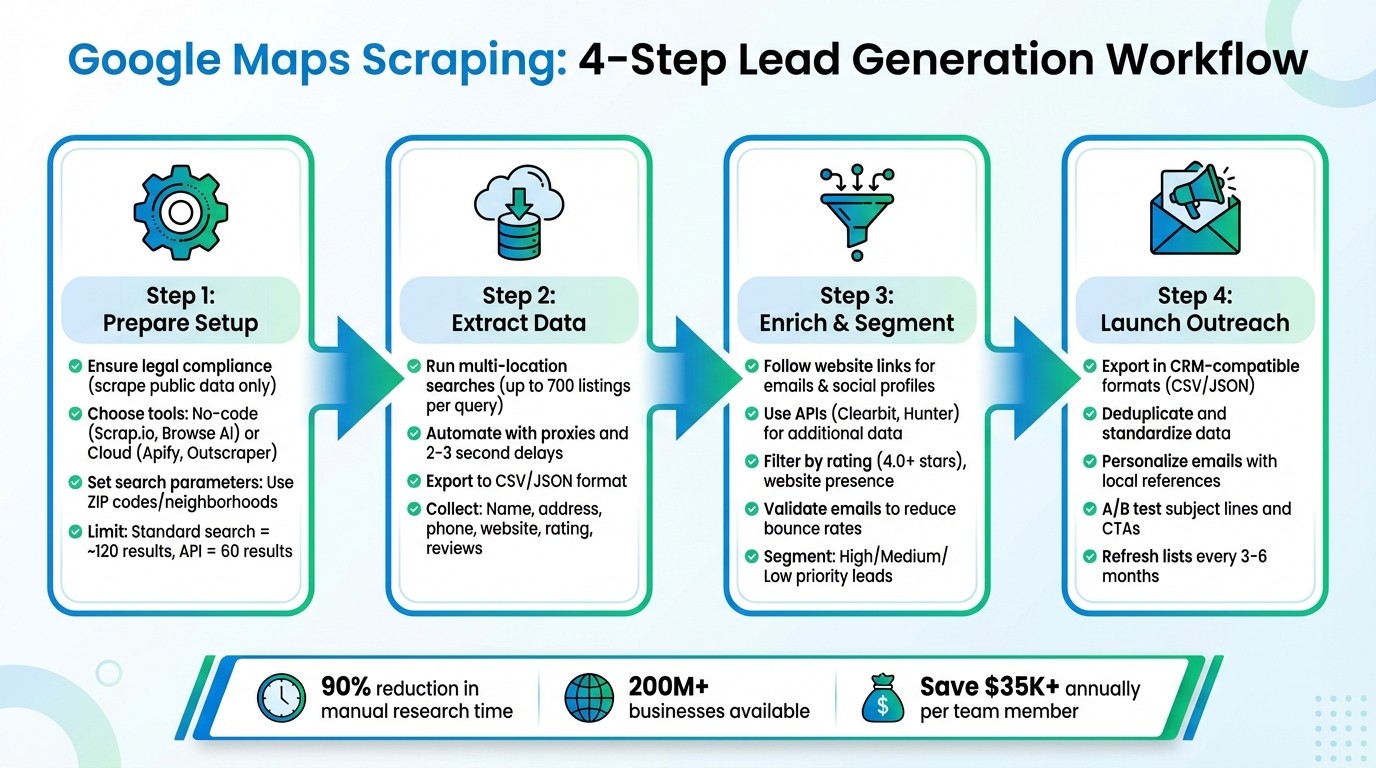
4-Step Google Maps Scraping Workflow for Multi-Location Lead Generation
How to Scrape UNLIMITED Leads on Google Maps with N8N & Apify
Step 1: Prepare Your Google Maps Scraping Setup
To get started, focus on three key areas: legal compliance, tool selection, and search parameters. These steps are essential to ensure you can gather actionable data for your multi-location lead generation efforts while staying within the rules.
Legal and Ethical Requirements
Google’s Terms of Service (Section 3.2.3) explicitly prohibit exporting or scraping content from Google Maps [9]. However, this is a contractual issue, not a criminal one. U.S. courts, including in the LinkedIn vs. HiQ Labs case, have ruled that scraping publicly available data is legal. The Ninth Circuit clarified that “the CFAA’s ‘without authorization’ provision doesn’t apply to public data” [9].
Stick to scraping only publicly available business information - such as business names, categories, addresses, phone numbers, and website URLs [8]. If you’re targeting businesses in California or dealing with personal data like a sole proprietor’s name, you’ll need to comply with regulations like GDPR, CCPA, or CPRA. This means providing opt-out options and honoring deletion requests [8][9].
To protect your Google account and avoid service suspensions, scrape anonymously. Scraping while logged into your Google account can lead to account-wide suspensions [9]. Use a "Discover → Verify → Enrich" workflow: start by scraping Google Maps to gather initial data, then visit each business’s website to verify and enrich the information with additional details [8].
Once you’ve covered the legal bases, it’s time to choose the right tools for the job.
Select Your Scraping Tools
The tools you choose are critical for efficient data extraction. For non-technical teams, no-code platforms like Scrap.io (offering 100 free leads) and Browse AI (starting at $19/month, billed annually) are excellent options [11]. These platforms feature user-friendly interfaces and handle technical aspects like proxy rotation and anti-blocking automatically.
If you’re looking for more privacy and control, browser-based desktop tools like Botsol might be a better fit. These tools run a real Chrome browser on your machine and don’t incur per-record costs, making them ideal for bulk jobs [3]. For larger-scale tasks, cloud platforms like Apify (starting at $35/month) or Outscraper (pay-as-you-go, around $2 per 1,000 records after the first 500 free) provide the scalability needed for enterprise-level operations [11].
Key features to look for include:
Proxy rotation to avoid IP bans
The ability to handle JavaScript-loaded content
Data enrichment tools that can follow website URLs to uncover emails and social media links not visible on Google Maps listings [12]
Before diving into a large-scale project, always run a pilot test with 3–10 queries to ensure the CSV structure and data fields meet your needs.
With your tools in place, the next step is to define your geographic and business search parameters for optimal results.
Set Geographic and Business Parameters
Google Maps limits standard searches to about 120 results per query, and even the official Places API maxes out at 60 results per query [2][4]. To navigate this limitation, divide large areas into smaller units, such as ZIP codes or neighborhoods. For example, if your HVAC business operates in Dallas, Houston, and San Antonio, focus your searches at the ZIP code or neighborhood level rather than searching city-wide [3][1].
When structuring your search queries, combine a specific business category with a precise location. For example: "HVAC contractors in Dallas 75201" or "janitorial services in Houston 77002". Google offers nearly 4,000 business categories, so using specific terms like "Divorce attorney" or "Commercial cleaning service" will yield better results than generic keywords [11][10]. To streamline batch automation, create a text file with each search term listed on a new line [6][1].
You can improve lead quality by adding filters to your search parameters. For instance:
Minimum rating (e.g., 4.0 stars or higher)
Review count thresholds (e.g., 50+ reviews)
Operational status (e.g., open now, claimed listings)
Another strategy is to target businesses with "missing assets" - such as high review counts but no listed website. These businesses are prime candidates for digital services [11][5]. To avoid duplicate listings in overlapping search areas, use latitude and longitude coordinates to deduplicate results when running multi-location queries [6][1].
Step 2: Extract Business Data from Google Maps
Now that you’ve set your parameters in Step 1, it’s time to dive into the details. This step focuses on pulling valuable business data from Google Maps and turning your queries into well-structured lead lists.
Run Multi-Location Searches
Start by executing your search queries across all your target locations. Many professional scraping tools let you upload a text file with one search term per line - examples could include "HVAC contractors in Dallas 75201" or "janitorial services in Houston 77002." These tools can then process the searches in sequence or even run them simultaneously. Advanced tools can pull data from up to 700 listings, depending on how specific your search is [13]. Using ZIP codes or neighborhoods, as outlined earlier, helps you uncover businesses that might otherwise be missed. Once your queries are ready, automate the process to capture all the dynamic details efficiently.
Automate the Data Collection Process
To make this process both effective and safe, use automation tools paired with residential proxies. These proxies help mimic human browsing behavior, reducing the risk of detection. Google Maps listings often load dynamic elements like review counts and service categories through background requests. To capture this information, you’ll need browser automation tools like Puppeteer or Selenium. Rotate your proxies regularly and add random delays of 2–3 seconds between actions to further minimize blocking risks. As MapScraping.com explains:
Google Maps scraping replaces repetitive manual work with automation, turning what used to take days into a matter of minutes [4].
Before scaling up, run a small test with 3–10 queries to make sure the data structure aligns with your needs [6].
Export and Organize Your Data
Once the data is collected, save it in a structured format like CSV or Excel for easy CRM integration, or in JSON if you’re working with programmatic workflows [14]. Your dataset should include key fields such as business name, full address (split into city and ZIP code), phone number, website, email, coordinates, category, star rating, and review count [14]. Be sure to also include the original search term and scrape date for each entry. This helps with segmenting leads, spotting coverage gaps, and deduplicating records by matching business names with their addresses or coordinates [14][6]. Use consistent file naming conventions, like "hvac_dallas_01_16_2026.csv", to keep everything organized [7]. Properly structuring your data now will make the next steps - enrichment and outreach - much smoother.
Step 3: Enrich and Segment Your Lead Data
Once you've structured your extracted data, the next step is to turn those basic lists into actionable leads. Enrichment fills in the gaps, giving you the details needed for more personalized outreach and helping you decide which businesses to prioritize.
Collect More Business Details
Your initial data scrape might have captured the basics - business names, addresses, and phone numbers - but that's just the starting point. To make your outreach effective, you'll need more. Scraping tools can follow website links to gather emails, social media profiles, and other contact details [15][3][4]. Advanced tools can even identify key decision-makers, ensuring your outreach gets to the right person [15][2].
You can also collect technical metadata, like the type of CMS a business uses (e.g., WordPress) or whether they have advertising pixels installed. This kind of information helps you tailor your pitch to match the business's digital readiness [4]. For even more detailed insights, you can use third-party APIs like Clearbit or Hunter to add data such as company size, industry, and verified contact information [3][6].
Filter and Prioritize Leads
Not all leads are equal, so it's important to filter and prioritize them. For example, you might focus on businesses with a website and a 4.0-star rating or higher [15][1]. Review counts and whether the business has multiple locations can also help you gauge its scale [3][6].
Segment your leads based on how ready they are for outreach. High-priority leads might have a website, email, and phone number. Medium-priority leads might be missing an email address, and incomplete listings could be better suited for SEO research [6]. Before you start any campaigns, validate email addresses using tools like NeverBounce or ZeroBounce to minimize bounce rates and maintain your sender reputation [1][6].
Automate Enrichment with Cohesive AI
Once you've filtered your leads, automation can take your enrichment process to the next level. Manually enriching thousands of leads across different locations is time-intensive, but tools like Cohesive AI can handle it for you. This platform scrapes Google Maps for local business data, enriches each lead with additional contact details, and even personalizes cold emails based on the business's services, reviews, and location.
Cohesive AI also manages email deliverability and can run up to three campaigns simultaneously, allowing you to target multiple segments at once. For $500 a month, it guarantees at least four interested responses, making it a cost-effective alternative to traditional lead generation agencies. This automation seamlessly connects your data enrichment process with your outreach efforts, keeping everything efficient and scalable.
Step 4: Export Leads and Start Your Outreach Campaigns
Now that your leads are enriched and neatly organized, it’s time to take the next step: exporting your data and launching your outreach campaigns.
Export Data in CRM-Compatible Formats
When exporting your data, choose formats that work seamlessly with your CRM. CSV files are a go-to option, as they’re compatible with popular CRMs like HubSpot, Salesforce, and Pipedrive. If you’re dealing with more complex, nested data (e.g., business hours or multi-layered information), JSON files might be a better fit for programmatic workflows.
Before importing your data, take a moment to clean things up. Here’s what to focus on:
Deduplicate entries: Use business names and normalized addresses or coordinates to ensure no duplicates slip through.
Standardize phone numbers: Convert them to the E.164 format (e.g., +1 555 123 4567) for consistency.
Verify email addresses: Double-check that emails are valid and active.
Tag your leads: Add tags that reference the original search query and scrape date (e.g., "HVAC contractors Phoenix – 01/16/2026"). This makes location-based personalization and time-sensitive follow-ups much easier.
When mapping your data to CRM fields, make sure key columns like Company Name, Phone, Website, Email, and City match up correctly. To avoid errors, run a small test batch (3–5 searches) to confirm that everything - from headers to data types - is formatted properly before committing to a full-scale import.
Once your data is ready to go, you can shift your attention to crafting and sending targeted emails.
Launch Your Email Campaigns
With your enriched leads in hand, you can now focus on executing a well-planned outreach strategy. To maintain high deliverability rates, stagger your email sends in smaller, controlled batches. Personalization is key here - start each email with a local touch. Mention the city, highlight a recent positive review, or reference a specific service the business offers. This approach makes your outreach feel more tailored and engaging.
Tools like Cohesive AI make it easier to handle large-scale, multi-location outreach. They automate everything from scraping and enriching to personalizing emails, offering an efficient alternative to traditional lead generation services.
For more customized workflows, platforms like Zapier or Make.com (starting at around $9 per month) can help automate the process. These tools can connect your scraper directly to your CRM, triggering actions whenever a new lead is added.
Don’t forget to experiment. Use A/B testing to refine your subject lines and calls to action. For instance, you could compare the effectiveness of offering a demo versus providing a free content download. Finally, refresh your lead lists every 3–6 months. Business details can change quickly, and outdated information could tarnish your credibility.
Conclusion
Using Google Maps scraping can transform lead generation for businesses operating across multiple locations. Instead of spending countless hours manually gathering contact details, this method allows you to compile thousands of qualified leads in just minutes. By setting up scraping parameters, extracting business data, enriching leads, and launching tailored outreach campaigns, you can create an automated system that works tirelessly in the background.
With data from over 200 million businesses worldwide [4][5], Google Maps provides a massive resource. Automating the process can cut down manual research time by as much as 90%, potentially saving each team member over $35,000 annually [16]. This efficiency lets your sales team focus their efforts on converting pre-qualified leads rather than wasting time searching for them.
Features like city or ZIP-level targeting and advanced enrichment tools allow you to capture more complete and accurate leads than the official API typically provides. Verifying contact details is critical for effective outreach, and adding personalized touches - like referencing a specific city or a recent review - can significantly improve email response rates.
For businesses juggling outreach across multiple locations, platforms like Cohesive AI offer a fully automated solution. From data scraping to AI-driven personalized outreach, this tool simplifies multi-location campaigns for a flat $500 per month. To maintain accuracy, it’s a good idea to refresh your lead lists every 3–6 months, as outdated information can hurt your credibility.
Start small by testing 3–10 searches to ensure your data structure is sound, then scale up strategically across your target areas. By adopting this approach, you can build an automated lead generation system that keeps your sales pipeline full, leaving your competitors stuck scrolling Google Maps manually. Stay ahead of the curve with a smarter, more efficient strategy.
FAQs
How can businesses legally scrape Google Maps for lead generation?
To stay on the right side of the law when scraping Google Maps, businesses should focus on two critical areas: following Google’s terms of service and respecting data privacy laws.
Start by ensuring that you only gather publicly accessible information. This includes details like business names, addresses, phone numbers, websites, categories, ratings, and hours of operation. Steer clear of private data or methods that bypass protective measures, such as captchas or rate limits, as these actions could breach U.S. laws. Use the collected data for discovery purposes and cross-check it with reliable sources, like the business's official website or public directories, to minimize legal risks.
Additionally, make sure your practices align with privacy laws such as the CCPA in the U.S. and the GDPR internationally. Create a clear compliance plan, limit data collection to what’s strictly necessary, and offer transparent opt-out options for any outreach efforts. Running scrapers responsibly, securing the data you collect, and keeping thorough records of your activities can further show that you’re taking ethical and legal considerations seriously.
What are the easiest tools for beginners to scrape leads from Google Maps?
For those just starting out, the best tools are simple to use, require no coding skills, and come equipped with features like anti-blocking measures and data export options. Apify is an excellent pick, featuring pre-built tools, a visual editor, and a free plan to help you get started. Another beginner-friendly choice is Browse AI, which offers a straightforward point-and-click interface along with intelligent data management. Paid plans for these tools typically range from $19 to $35 per month, depending on the features you need.
If you’re after a more integrated solution, particularly for local service businesses, Cohesive AI has you covered. It streamlines the process by combining Google Maps scraping with automated email personalization and campaign management. This means you can smoothly transition from gathering data to running outreach campaigns - all without needing multiple tools. These options make it quick and easy to collect essential lead information, like names, addresses, phone numbers, and websites, in just a few minutes.
How can businesses effectively organize and prioritize lead data from Google Maps?
To transform raw Google Maps data into useful leads, start by adding relevant details to each record. Include information like the business's industry, location, and indicators of size - such as the number of Google reviews, their average rating, or whether they operate multiple locations. These details help you align potential leads with your Ideal Customer Profile (ICP), ensuring more precise targeting.
Next, clean and verify the data. This means removing duplicates, fixing any errors, and confirming contact details like phone numbers and email addresses. Once the data is cleaned up, assign a score to each lead based on factors like high ratings (think 4 stars or more), the number of reviews, and how close they are to your target area. Use this scoring to prioritize your outreach - focus on the high-scoring leads first while keeping the lower-priority ones for future engagement.
Finally, consider leveraging an AI-powered tool like Cohesive AI to simplify your outreach process. These tools can automate email personalization and campaign management, helping you connect with top leads more efficiently and grow your pipeline faster.